Read AI summary
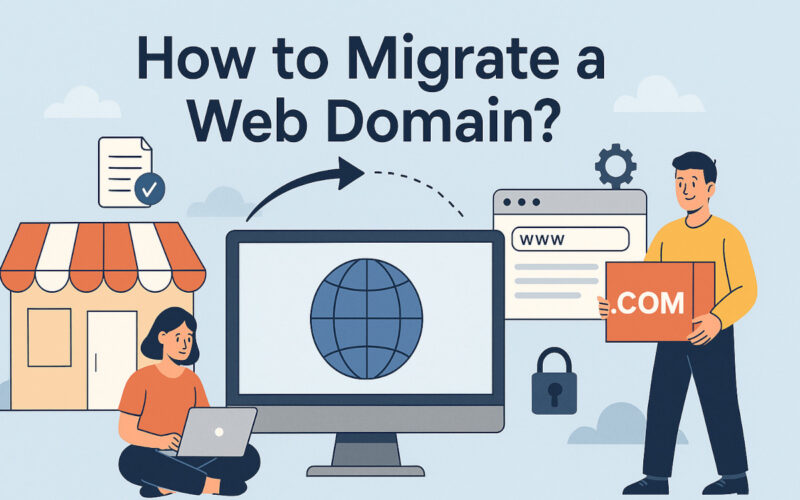
Imagine your website is like a physical store on a busy street. Over time, you might decide that this street is no longer the best location, or you might change your store’s name to better reflect what you offer. In the digital world, something similar happens when you decide to migrate a domain. It’s not just a technical change; it’s a strategic decision that can revitalize your online presence, better align it with your current brand, or even improve your search engine ranking.
Domain migration means moving your website from one web address (URL) to another. Think of it as changing the address of your home or business, but online. This process, although common, must be handled carefully. A poorly executed domain change can confuse your visitors, cause you to lose visibility on Google (negative SEO impact), and affect the accessibility of your website. But when well planned, it can be a key step for growth, improving your branding, and ensuring your audience can easily find you under your new digital identity.

What does domain migration involve?
Understanding what exactly a domain migration is is the first step. You’ll often hear terms like “domain change,” “domain transfer,” or “domain name change,” and while they may have subtle differences, they generally refer to the process of changing the main URL under which your website is accessible.
It’s not just about buying a new name; it involves redirecting all the traffic and the accumulated “authority” from your old domain to the new one, ensuring the transition is as smooth as possible for both users and search engines.
This process is often carried out for various strategic reasons. Perhaps your company has undergone a complete rebranding and needs its web address to reflect the new brand (changing the domain name). Other times, it may result from a merger or acquisition. There are also technical or SEO-related reasons, such as switching to a more relevant domain extension (.com instead of .net, for example) or securing a shorter, more memorable, and optimized name. Deciding to change a website’s domain is, essentially, giving your project a new digital storefront.
👉 In our last article, we explained the difference between CAPTCHA and reCAPTCHA.
Before Migrating: Essential Preparations
A successful domain migration starts with good planning. Before migrating a domain, several key steps must be taken:
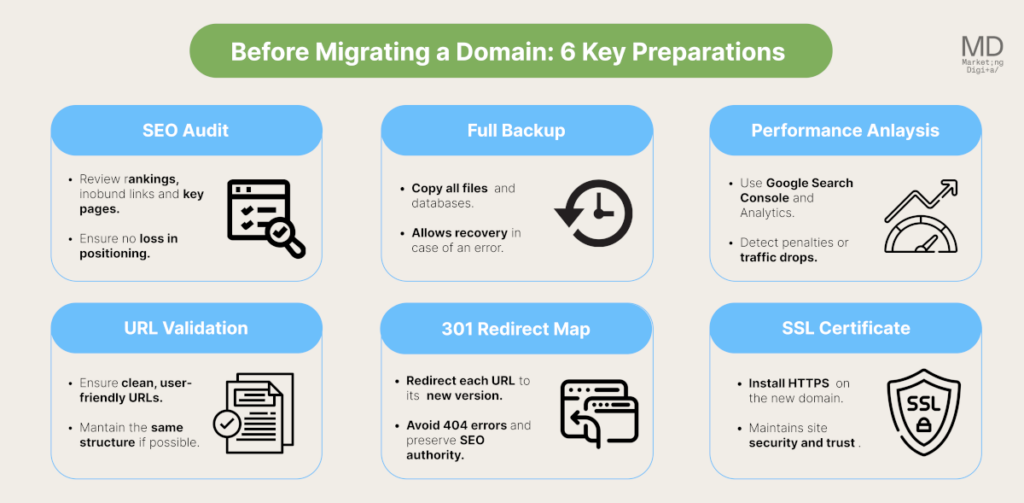
- SEO Audit of the Current Domain: Review search engine rankings, identify important pages, and check incoming links. This helps ensure nothing is lost during the transition.
- Full Site Backup: Make backups of all files and databases. If anything goes wrong, you’ll be able to restore the site.
- Performance Analysis: Use Google Search Console and Google Analytics to measure current traffic and detect potential issues. Check for penalties or errors on the old domain.
- URL and Architecture Validation: Ensure your URLs are clean and user-friendly. Keep the site structure on the new domain the same or very similar if possible.
- Plan 301 Redirects: Create a redirect map to send each old URL to its new equivalent. This prevents 404 errors and preserves SEO authority.
- SSL Certificate on the New Domain: If your site uses HTTPS, install the certificate on the new domain before the migration to maintain security.
👉 SEO vs GEO: What’s the difference and when is it best to apply each strategy? We explain it in our latest article.
Choosing the New Domain Correctly
Choosing the right domain is vital. Pick a name that reflects your brand and is easy to remember. When searching for your new domain, check availability and consider the most relevant extensions (.com, .es, .net, etc.). Avoid conflicts with registered trademarks; search for similar names to avoid infringement.
For example, when changing a website’s domain, make sure the new name is intuitive and consistent with your industry. Also consider the length: a short and clear domain is usually easier to remember.
👉 Discover what vibe coding is and how to apply it effectively in our new article.
Make Sure the New Hosting is Ready
If you’re not only changing your domain name but also migrating your domain to a different hosting provider (moving your website to another server), make sure the new server is reliable. Set up the hosting with the same or better technology (PHP version, database, etc.). Check the compatibility of all plugins, themes, and applications you use. Don’t forget to set up SSL on the new hosting to maintain security. Test the new server’s performance—it should offer good speed and stability.
👉 In our latest article, we explain what SEO for LLMs is and how to adapt your strategy to this new search paradigm.
Plan 301 Redirects from the Old Domain
The heart of SEO migration is proper redirection. Create a 301 redirect map that matches each old URL to its new equivalent. Don’t leave broken URLs: check every page and its internal links. Use SEO tools or a redirection plugin to implement them on your server.
301 redirects tell Google that your site has moved permanently, preserving most of your ranking. Plan this step carefully: in the case of an online store, poor redirection can cause checkout issues or loss of sales.
A practical example of implementing 301 redirects on an Apache server would be adding the following code to the .htaccess file:

On Nginx servers, the configuration would be different but serves the same purpose: ensuring any user or bot visiting a URL from your old domain is automatically redirected to the equivalent page on the new one.
How to Migrate a Domain Step by Step?
Once preparations are complete, follow these technical steps to migrate the domain:

- DNS Change and Propagation: Modify the DNS records to point to the new server (if applicable). Global domain propagation can take anywhere from a few hours to 48 hours, so your site may alternate between both domains during that time. For example, if you need to migrate your domain to another host, be sure to update the DNS records (A, CNAME) to point to the new server.
- Implement 301 Redirects: Set up redirects on the old server. If using .htaccess or Nginx, add the necessary 301 rules for each page. Check that entering any old URL redirects the browser to the correct new address.
- Update Internal Links: Review the site content on the new domain. Update internal links so they point directly to the new domain instead of relying on redirects. This improves crawl speed and prevents errors.
- Generate and Upload an Updated Sitemap: Create a new XML sitemap with all URLs from the new domain. Upload it to the server and ensure it’s accessible at yournewdomain.com/sitemap.xml. You can resubmit it to Google Search Console later.
- Check Canonical Tags: If your content had rel=”canonical” tags pointing to the old domain, update them to point to the new domain. This reinforces to Google which is the primary URL for each page.
- Submit the Change to Google: In Google Search Console, add and verify the new domain property. Use the “Change of Address” tool to notify Google about the migration. Also upload the new sitemap there.
- Initial Monitoring: In the first few days, keep an eye on Google Analytics and Search Console. Watch for crawl errors or unexpected traffic drops.
SEO Considerations During and After the Migration
Domain migration can impact your SEO if not handled carefully. To avoid traffic loss:

- Monitor Search Console: You’ll see crawl errors and coverage alerts there. Fix any URLs that aren’t redirecting properly.
- Use Google Analytics: Watch for drops in visits. Analyze landing pages and sources of organic traffic.
- Update Important Backlinks: Reach out to partners or key websites linking to your site and ask them to update the link with your new domain.
- Maintain Titles and Content: Even if you’re changing domains, try not to drastically alter titles, meta descriptions, or content. Consistency helps Google recognize the change more quickly.
- Avoid Major Simultaneous Changes: If you’re migrating a domain, don’t make massive content or structural changes at the same time. Do the migration first, then make other adjustments separately.
At MD Marketing Digital, we always recommend supporting the migration with a solid communication strategy—inform your users via social media or newsletters about the new domain. This reinforces visibility and reduces confusion among your audience.
👉 In our latest blog post, we explained step by step how to pay for Google Ads.
Common Mistakes When Migrating a Domain (and How to Avoid Them)
When migrating a domain, there are several common pitfalls you should avoid:
- Not Setting Up 301 Redirects: Forgetting redirects is one of the most serious mistakes. Without them, visitors and Google will find 404 pages, leading to a loss in rankings. Always implement full redirects.
- Not Testing Before Going Live: Launching the change without testing redirects and the new server can cause failures. Test everything in a staging environment or during a low-traffic period.
- Changing URL Structure at the Same Time: If you’re changing URL paths during the migration (e.g., removing categories or renaming URLs), it complicates crawling. Make such changes separately or with extreme caution.
- Not Communicating the Change: To both Google and users. Failing to notify (via Search Console or announcements) can lead to confusion and traffic loss.
- Neglecting On-Page SEO: Changing the domain isn’t an excuse to improvise titles or meta descriptions. Keep a complete on-page SEO audit to ensure everything is optimized on the new domain.
With a proper checklist and careful review of each step, you can prevent these mistakes.
Frequently Asked Questions About Domain Migration
We know that the domain migration process raises many questions. Here we answer some of the most common ones to clarify the picture.
What is domain migration?
Domain migration is the process of moving a website from an old domain to a new one. It involves changing the domain name in the URL and setting up redirects to avoid losing traffic or SEO rankings. It’s like changing the address of a physical store: you need to make sure everyone knows you’re now located somewhere else.
How long does it take for a new domain to propagate?
When you change the DNS records for a new domain, propagation can take anywhere from a few hours up to 48 hours worldwide. During that time, some users will see the site on the old domain, others on the new one, depending on their internet provider. That’s why it’s important to carry out the migration during a low-traffic period and communicate the expected date of the change.
Can you change a domain name without losing SEO?
The answer is yes: you can change a domain name (or a website’s domain) without losing SEO, but it requires a careful strategy. Keep 301 redirects in place and avoid unnecessary content changes. When done correctly, your rankings will gradually transfer to the new domain. However, there will always be a slight temporary impact that can be recovered with monitoring and patience.
How do you migrate a domain to another hosting provider?
First, make sure the new server is properly configured (DNS, SSL, software), then copy all files and databases to the new hosting. Next, update the domain’s DNS to point to the new server. Implement 301 redirects if you’re also changing the domain, and test everything to ensure it works correctly. This process of migrating a domain from one host to another is similar to changing a domain name, but it focuses on moving the website to a new hosting provider.
Do you need help migrating your domain?
Changing a domain name is a significant task that requires detailed planning and careful execution. From the strategic selection of the new name and technical preparation, to the implementation of 301 redirects and effective communication with Google, each step is crucial to ensure a successful transition. The goal should always be to maintain and improve user experience and preserve the valuable SEO rankings that have taken time and effort to build.
Although it may seem intimidating, by following a clear roadmap and paying close attention to the details, it is entirely possible to migrate a website domain without serious issues. Remember to closely monitor results after the switch and be ready to make adjustments if needed. If this process feels beyond your current capabilities or you simply prefer to leave it in expert hands to ensure the best outcome, don’t hesitate to seek professional help.
At MD Marketing Digital, we have experience handling complex web migrations. If you need support to ensure your domain change is a resounding success, contact us—we’d be happy to help you navigate this strategic process for your online business.

- Topical Authority: What It Is and How to Build It with an SEO Strategy - September 11, 2026
- Attribution Models in Marketing: What They Are, Types, and How to Choose the Right One - September 4, 2026
- SEO for LLMs: how to adapt to the new AI-powered search - August 18, 2025
¿Qué te pareció este artículo?
What do you think about this post?