
Read AI summary
When a website changes domains, reorganizes its URL structure, or removes pages that no longer have a reason to exist, what happens to the traffic and ranking it has built up? The answer, in most cases, lies in the 301 redirect.
It is one of the most important resources within technical SEO, and also one of the most misunderstood. When implemented properly, a 301 redirect preserves the ranking work that took months or years to build. When executed poorly or ignored, it can result in traffic losses that are difficult to recover.
In this article, we explain exactly what this type of redirect is, when to use it, how to configure it in different environments, and which practices should be avoided so as not to compromise your site’s SEO health.

What is a 301 redirect?
A 301 redirect is an instruction that tells the server that a URL has been moved permanently to a new address. The HTTP status code 301 (“Moved Permanently”) is how the server communicates that change to both browsers and search engine crawlers.
When a user or a crawler tries to access the original URL, the server responds with that code and automatically points to the new address. The process is almost invisible to the user, who simply arrives at the destination page without noticing the redirect. For Google and Bing, however, the message is clear: this URL no longer exists here, it now exists there.
What distinguishes a 301 from other redirects is its permanent nature. Unlike a 302 redirect, which indicates a temporary move and therefore does not transfer SEO authority in the same way, a 301 tells search engines to update their index with the new URL. Google has confirmed on multiple occasions that 301 redirects transfer most of the PageRank from the original URL.
A 307 redirect is also temporary and is the modern equivalent of a 302, preserving the HTTP method in the original request. There is also the 308 status code (“Permanent Redirect”), which is the permanent equivalent of a 307: it transfers authority just like a 301, but preserves the original HTTP method as well (useful for POST forms). In SEO practice, 301 remains the standard; 308 is relevant in specific development contexts. None of the temporary redirects (302 or 307) is appropriate when the URL change is permanent.
👉 Want to understand what Query Fan-Out is and why it’s changing the way Google interprets searches? Read our latest article and discover how it’s impacting modern SEO strategies.
What is a 301 redirect used for in SEO?
Beyond the technical definition, the real value of a 301 lies in the scenarios where it is applied. These are the most common uses.
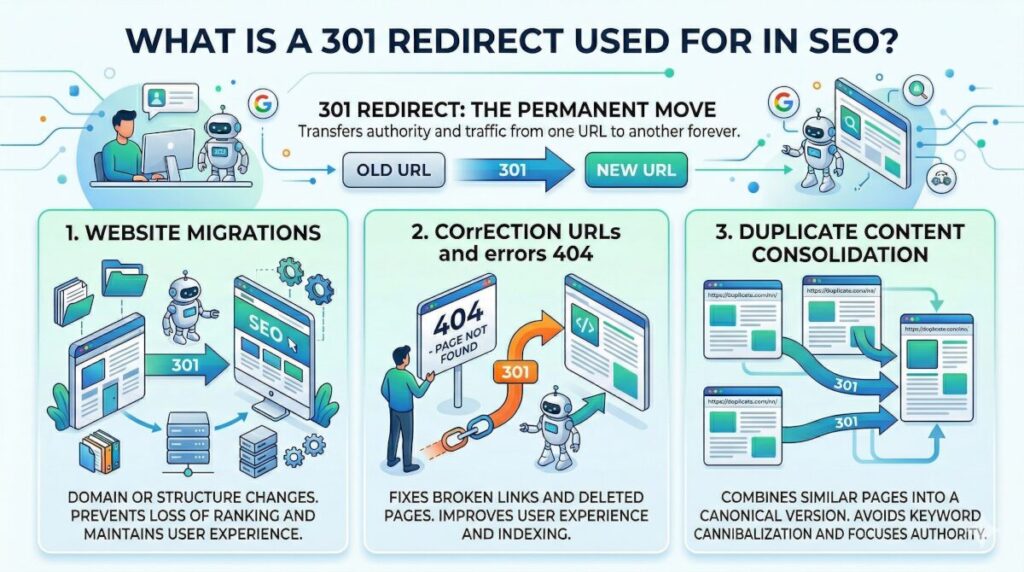
Website migrations
Migrations are the moment of greatest SEO risk in the life of any website. Changing domains, moving from HTTP to HTTPS, migrating from one platform to another, or restructuring the URL architecture are all operations that, without properly configured redirects, can destroy the ranking that has been achieved.
When a migration is carried out with a complete redirect map (URL by URL, from source to destination), search engines understand that the site has changed but the content is still there. Organic traffic and the authority accumulated through external backlinks then have a real chance of being preserved. If you are planning a migration, it is advisable to work with technical SEO specialists who can audit the process before, during, and after the change.
👉 What’s better for your site: a domain with or without www? In our latest article, we tell you which option to choose and how to configure it correctly to avoid SEO problems.
URL correction and 404 errors
Pages that have been removed or whose URLs have changed without an active redirect generate 404 errors. Those errors frustrate users who arrive through an old link and also represent a loss of SEO authority when there are backlinks pointing to those addresses.
Implementing a 301 redirect to the most relevant content on the site recovers part of the lost value and improves the navigation experience.
👉 Discover what vibe coding is and how to apply it effectively in our new article.
Duplicate content consolidation
One of the classic problems websites face is duplicate content generated by URL variants. A single site may be accessible from http://example.com, https://example.com, http://www.example.com, and https://www.example.com. For the user, they are the same page; for Google, they are potentially four different versions competing with each other.
Establishing a canonical version and redirecting all the others with a 301 consolidates authority into a single URL. This also applies when there are pages with very similar content that should be merged under one single address.
How to create a 301 redirect step by step
The way to implement a 301 redirect depends on the type of server and the platform you use. Here are the most common methods.
301 redirect in .htaccess
The .htaccess file is the standard method for Apache servers. To redirect a specific URL to another, add the following line inside the file:
Redirect 301 /old-page https://www.example.com/new-page
To redirect an entire domain, for example from HTTP to HTTPS, you can use:
RewriteEngine On
RewriteCond %{HTTPS} off
RewriteRule ^(.*)$ https://%{HTTP_HOST}%{REQUEST_URI} [L,R=301]
It is essential to make a backup of the .htaccess file before modifying it, since a syntax error can make the site inaccessible.
Redirect in a CMS (WordPress, etc.)
In WordPress, the easiest way to manage redirects is through specialized plugins. Redirection is one of the most widely used options: it allows you to create redirects from the admin panel without needing to touch server files. It also logs the site’s 404 errors, which makes it easier to identify which URLs need a redirect.
Another popular alternative is Yoast SEO Premium, which includes a built-in redirection feature with automatic detection of permalink changes. For sites with a high volume of URLs and complex migrations, Rank Math offers similar options with a more intuitive interface.
Server- or hosting-level redirects
Many hosting control panels, such as cPanel or Plesk, include a specific section for managing redirects without needing to manually modify configuration files. This option is convenient when there is no direct access to the server or when the technical team prefers to avoid manual editing of the .htaccess file.
For sites on Nginx servers, redirects are configured directly in the server configuration file:
return 301 https://www.example.com/new-page;
In managed hosting environments or cloud solutions such as Cloudflare, it is also possible to configure redirect rules from the control panel itself, without any intervention on the server.
Best practices when implementing 301 redirects
Setting up a redirect is not just about writing the code. There are implementation criteria that make the difference between doing it properly and creating new problems.
Avoid redirect chains
A redirect chain occurs when URL A redirects to URL B, which in turn redirects to URL C. Each additional hop involves a new HTTP request, which increases load time and dilutes the SEO authority being passed along. Google does crawl these chains, but it does so less efficiently, and in long chains it may stop following them altogether.
The recommendation is always to redirect directly from the original URL to the final URL, and to periodically check that chains have not gradually accumulated over time.
Maintain consistency in the structure
Redirects should point to the most relevant page for the user. Redirecting everything to the homepage may seem convenient, but search engines penalize this practice when the destination URL is not related to the original content. The general rule is to take the user to the closest equivalent of the content they were looking for.
Update internal links
A 301 redirect solves the problem for external users and for Google, but it does not eliminate the root cause when internal links still point to the old URL. The right approach is to update those links directly in the site’s HTML to avoid the extra load caused by redirects on every internal request. This is especially relevant for sites with many pages or a high crawl frequency.
Common mistakes in 301 redirects
Implementing redirects poorly can be almost as harmful as not implementing them at all. These are the mistakes that appear most often.
Redirecting to irrelevant pages
When the destination URL has no topical relationship to the original one, Google may interpret the redirect as a sign of bad intent or simply ignore it. The impact is not only technical: a user looking for an article on a specific topic who lands on a completely different page will leave the site immediately, increasing the bounce rate and worsening behavioral signals.
Not implementing redirects during migrations
This is the most costly mistake. Migrating a site without setting up redirects is equivalent to starting from scratch in SEO: Google loses track of the indexed URLs, backlinks stop passing authority, and organic traffic can drop drastically within a few days. Recovering those rankings can take months, even with an active strategy.
Using a 302 instead of a 301
The confusion between a 301 and a 302 is one of the most common technical mistakes, especially in implementations carried out without prior experience. A 302 tells Google that the change is temporary and that it should continue indexing the original URL. If the change is permanent and a 302 is used, the accumulated authority is not transferred correctly and the old URL may continue appearing in search results instead of the new one.
How to audit 301 redirects on your site
Knowing that redirects exist is not enough; you need to verify that they are working properly. A complete SEO audit always includes reviewing the status of redirects as one of its key points.
- Screaming Frog SEO Spider is the most widely used tool for auditing redirects at a technical level. It allows you to crawl the entire site, identify redirect chains, detect redirects that point to 404 errors, and export the full list of HTTP status codes. The free version covers up to 500 URLs; for larger sites, the paid version is essential.
- Google Search Console shows pages with coverage errors, including URLs that return 404s. If a URL with backlinks or relevant traffic appears with that error, it is a sign that a redirect is missing or that the existing one is misconfigured.
- Ahrefs and Semrush allow you to audit the backlink profile and detect external links that point to URLs that no longer exist or that have active redirects. From the site audit section, it is also possible to identify redirect chains and loops.
A basic audit process involves: crawling the site with Screaming Frog while filtering by 3xx codes, reviewing the errors reported in Search Console, cross-checking that information with the backlink profile, and manually verifying the most critical redirects using the Redirect Path extension for Chrome.
Conclusions
301 redirects are a fundamental tool in any technical SEO strategy. They help preserve rankings during migrations, fix broken URLs, consolidate duplicate versions of the same content, and maintain the structural consistency of a website over time.
Their implementation, however, requires good judgment. A poorly configured redirect, a long redirect chain, or simply choosing the wrong status code can cancel out the intended benefits. That is why, for medium- and large-scale projects, the most advisable approach is to rely on a team that understands both the technical side and the SEO implications of each decision.
At MD Marketing Digital, we handle migrations and technical optimization with an audited process from start to finish. If you are about to change domains, restructure your site, or simply want to make sure your website redirects are properly implemented, we can help. Contact us and we’ll review it together.
- Vibe coding: improvising with AI or a new way to program? - August 3, 2026
- Domain with www or without www: which is better for SEO? - June 22, 2026
- 301 redirect: what is it and why is it key in SEO? - April 23, 2026
¿Qué te pareció este artículo?
What do you think about this post?