
Read AI summary
Many websites generate more pages than search engines can process. This often happens on online stores or large portals. When a site accumulates thousands of filter combinations or automatically generated URLs, search engines waste time reading unimportant pages. As a result, your key articles or new products take longer to appear in search results.
Even if you have excellent content ideas for your brand, they are useless if Google never gets to see them.
To understand this problem, you first need to distinguish between three basic SEO concepts:
- Crawling: This is the process in which bots discover and read the pages on your site.
- Rendering: This is when the bot loads resources (such as JavaScript or CSS) to see the page the same way a user does.
- Indexing: This is the final step, where the search engine decides to store that page in its database so it can be shown in search results.
Optimizing web crawling does not guarantee better rankings, but it does ensure that the search engine finds your important content as soon as possible.

What is web crawl budget?
Crawl budget is the number of URLs that Google can and wants to crawl on your site within a given period of time.
It is important to clarify something from the start: crawling and indexing are two different things. The fact that Google’s bot (Googlebot) crawls a URL does not mean it will index it. If the page is low quality or duplicated, Google will read it, consume part of your crawl budget, and then discard it from the index. For more technical details, you can check the official documentation from Google: Crawl Budget Management.
How does Google determine a website’s crawl budget?
Google does not assign a fixed number of pages at random. Crawl budget comes from combining two factors: your server’s capacity limit and the demand or interest Google has in your site.
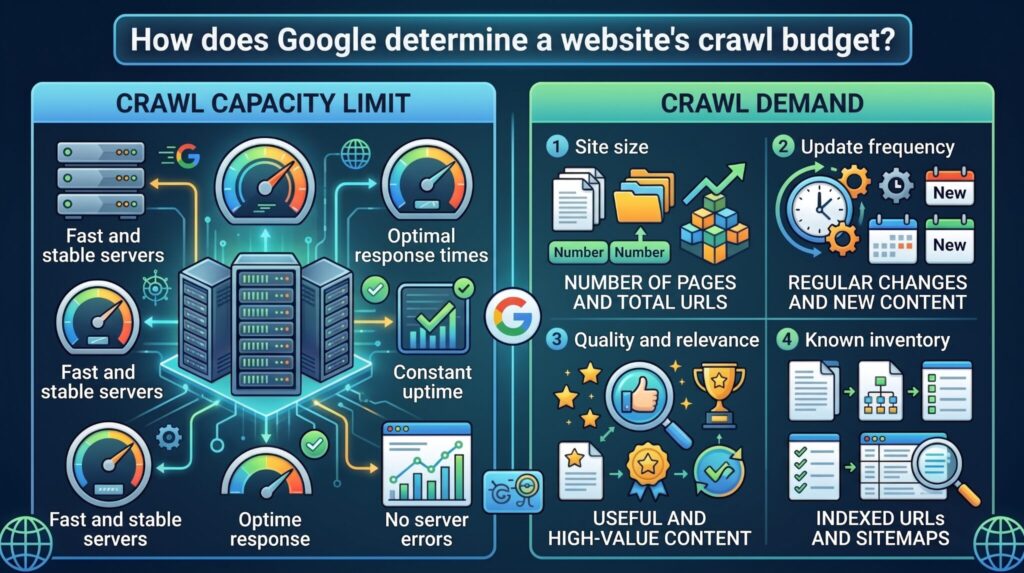
Crawl capacity limit
Google does not want to bring down your server. That is why it calculates a limit so it does not affect the experience of your real users.
If your server responds quickly and is stable, the limit goes up. But if the bot detects slowness, high latency, or starts receiving 5xx errors (server problems) or 429 errors (too many requests), it will immediately reduce the crawling intensity. Reviewing the Page Speed Insights metrics will help you understand whether your pages’ performance is limiting the bots’ capacity.
Crawl demand
Even if your server can handle millions of visits, Google will only crawl what it considers necessary. Demand depends on several factors:
- Site size: A site with 100,000 URLs needs more attention than one with 100.
- Update frequency: If you publish daily, Google’s crawl frequency will increase to capture those changes.
- Quality and relevance: Google prefers to allocate resources to useful and popular pages rather than outdated content.
- Known inventory: The total number of URLs Google has already discovered on your domain.
Do all sites need to optimize their web crawl budget?
No. If you have a small blog or a corporate website with 500 well-linked pages, crawl budget is not a problem for you. Google will crawl everything without difficulty.
This optimization is a real priority for:
- E-commerce sites with thousands of products.
- Marketplaces and real estate portals.
- News sites and large media outlets.
- Websites with faceted navigation (multiple filters that generate dynamic URLs).
How to know if a site has crawling problems
If you notice that your important pages take weeks to appear on Google, or that updates are not reflected quickly, you may have a problem.
Other signs include finding pages in Search Console marked as “Discovered – currently not indexed,” high server resource consumption by bots, or the indexing of irrelevant URLs.
To confirm this, use the following digital marketing tools focused on technical SEO:
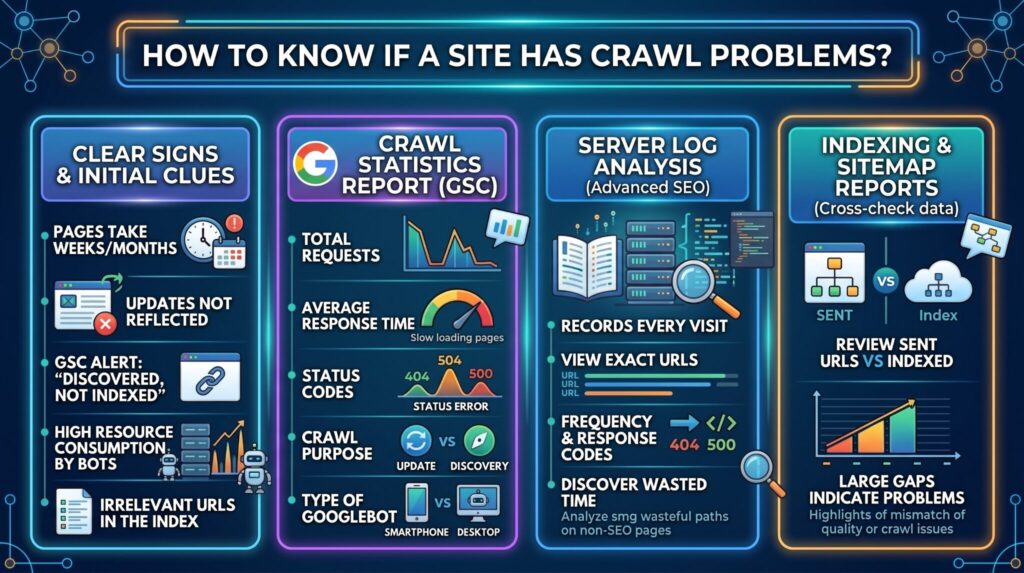
Google Search Console Crawl Stats report
This report is the starting point. Here you should look at:
- Total requests: Are there sudden drops?
- Average response time: If it is very high, the bot will crawl less.
- Status codes: Look for spikes in 404 or 500 errors.
- Crawl purpose: Check whether most of the effort goes into “Refresh” of known pages or “Discovery” of new ones.
- Googlebot type: Verify whether you are being crawled more by the smartphone bot (the ideal scenario) or the desktop bot.
The Search Console crawl stats give you a direct view of how Google interacts with your website.
Server log analysis
SEO log analysis is more advanced but very precise. Your server logs record every visit. By analyzing them, you can see exactly which URLs Googlebot visits, how often, and which response codes it receives. This is essential for discovering whether bots are wasting time on pages with no SEO value.
Indexing reports and sitemaps
Cross-reference the information. Check how many URLs you have submitted through your sitemaps and compare them with the ones that are actually indexed. Large gaps usually indicate content quality problems or crawling problems where the bot simply does not get to process everything.
Quick diagnostic table
| Signal | Diagnostic tool | Recommended action |
| Important URLs take a long time to get indexed | GSC: Pages (Discovered, not indexed) | Review internal linking and server performance. |
| Crawl spikes on filtered URLs | SEO log analysis | Set up rules in robots.txt or consolidate URLs. |
| General drop in crawl requests | GSC: Crawl Stats | Check for 5xx errors blocking Googlebot. |
How to optimize a website’s crawl budget
To optimize crawl budget, the goal is not to force Google to work harder. The goal is to make its path easier so it spends its resources on the URLs that really matter to you. Here are the steps to follow.
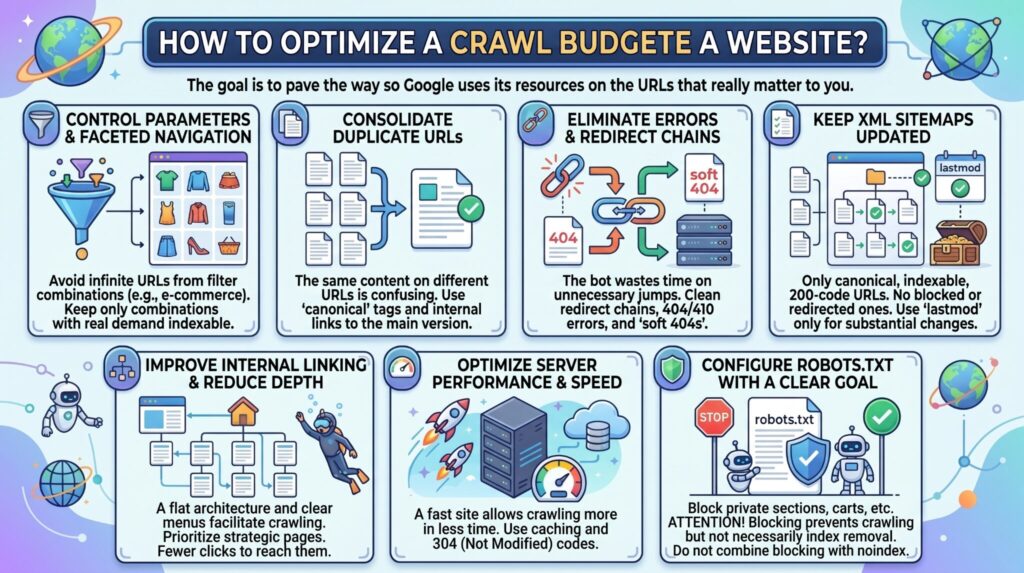
Control parameters, filters, and faceted navigation
A clothing e-commerce site can generate endless URLs if a user filters by “red t-shirts,” “size M,” “sort by lowest price,” and “brand X.” If each combination creates a different, crawlable URL, you will quickly exhaust your budget.
You should keep only the combinations with real search demand indexable. For the rest, you can consult the guide from Google: Managing crawling of faceted navigation URLs.
Consolidate duplicate URLs
If you have the same content accessible from different URLs, it confuses the search engine and splits your resources. Apply canonical tags pointing to the main version of the page. Make sure your internal links always point to the canonical URL so you do not send contradictory signals.
Eliminate errors, soft 404s, and redirect chains
A bot that jumps through four redirects to reach a final page wastes time. Clean up redirect chains. Also, if you permanently removed a product, make sure to return a clear 404 or 410 code, and fix “soft 404s” (pages that appear empty but return a 200 code).
Keep XML sitemaps up to date
Your sitemap should be a clean guide. Only include canonical, indexable URLs that return a 200 code. Do not include blocked or redirected pages. Use the lastmod attribute (last modification date) only when the content has changed substantially.
Improve internal linking and reduce depth
If a page needs 10 clicks from the homepage to be found, Googlebot will probably never reach it. Prioritize your strategic pages from the main menus. A flat architecture and good internal linking make crawling easier.
Optimize server and page performance
A fast site allows Google to crawl more pages in less time. Work on improving your website’s speed. Use efficient caching systems and configure your server to return 304 (Not Modified) codes when Google requests a page that has not changed since its last visit.
Configure robots.txt with a clear goal
The robots.txt file is your first line of defense. Use it to block the crawling of private sections, shopping carts, or internal searches.
Keep in mind something fundamental from the Google: Robots.txt introduction: blocking a URL via robots.txt prevents crawling, but it does not necessarily remove it from the index. If you need to use a noindex tag, the bot must be able to crawl the page in order to read that tag. Never combine a robots.txt block with a noindex.
Common mistakes when managing crawl budget
When trying to fix crawling problems, it is easy to make mistakes. Avoid doing the following:
- Blocking necessary resources: Do not block access to CSS or JavaScript files in robots.txt. Google needs to see them to render the page.
- Dirty sitemaps: Submitting non-canonical URLs or URLs with errors in your sitemaps.
- Overusing noindex: Using noindex as a magic solution. Remember that in order to read the noindex, Google first has to spend crawl resources visiting the page.
- Outdated links: Keeping internal links pointing to redirected or deleted pages.
- Confusing crawling with ranking: Believing that blocking pages will make Google assign that freed-up budget to other pages and, therefore, improve their rankings. That is not how it works.
How to measure whether crawl optimization is working
After applying the changes, you need to measure the results. The best way is to compare time periods using Search Console and your server logs.
You will know you are on the right track if you see:
- A higher proportion of Googlebot requests directed to your strategic pages and canonical URLs.
- A drop in the crawling of parameters, useless filters, and 404 errors.
- A lower average server response time in the GSC stats.
- Your new pages and updated products are discovered and indexed faster than before.
Optimize your site’s crawling with a technical SEO strategy
Crawl budget is not a problem for everyone, but if you manage a large site, handling it poorly can hide your best content from Google’s eyes. Optimizing crawling is a matter of efficiency: putting your house in order so search engines quickly find what adds value.
If you have an e-commerce site or a large portal and notice that your pages take a long time to get indexed, it is time to review the technical side. We invite you to contact our digital marketing agency. As an SEO agency, we thoroughly audit your architecture, performance, and server logs to build a comprehensive strategy that ensures Google always sees the best of your business.

- Crawl budget: what it is and how to optimize the crawling of a website - September 18, 2026
- Omnichannel Marketing: What It Is and How to Integrate a Brand’s Channels - August 28, 2026
- Conversion Funnel: What It Is and How to Create One - July 17, 2026
¿Qué te pareció este artículo?
What do you think about this post?