
Read AI summary
If you go to your site by typing www.yourdominio.com and it also works without the www, you probably haven’t given it much thought. But for Google, those two addresses can be two different sites, and that can cause some real problems: duplicate content, authority split between two versions, and errors in Google Search Console.
Choosing between www or without www doesn’t by itself determine whether your site will rank better or worse. What matters is choosing one version and making sure it’s properly configured throughout your site. In this article, we’ll explain what each option means, what problems arise from not defining it, and how to resolve it once and for all.

What is the difference between a domain with www and one without?
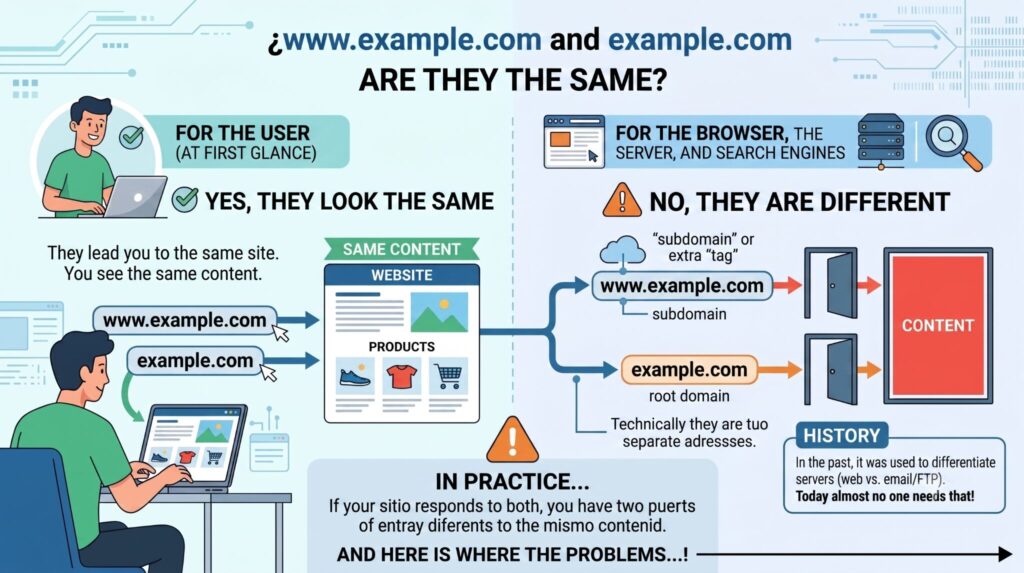
At first glance, www.example.com and example.com look like the same thing. For you, as a user, they are: both take you to the same site and you see the same content.
For browsers, servers, and search engines, however, they are two different addresses. The www is technically a subdomain of the main domain, a kind of extra “label” added to the URL. This comes from an era when it was used to differentiate the web server from other services (such as email or FTP), although today almost no one needs that separation.
In practice, this means that if your site responds at both www.yourdominio.com and yourdomain.com without any additional configuration, you will have two different entry points to the same content. And that’s where the problems we’ll cover later begin.
👉 Discover what vibe coding is and how to apply it effectively in our new article.
Is it better to use a domain with or without www for SEO?
There is no universal answer. Neither option has such a significant SEO advantage as to justify choosing one over the other for that reason alone.
What is decisive is choosing one version as your primary and maintaining it consistently throughout the site: in internal links, in the sitemap, on social media, in advertising campaigns, and in any material where your URL appears.
If you don’t make that choice explicitly, Google may end up interpreting both versions as separate sites. That means each one could get indexed on its own, receive backlinks on its own, and compete against each other for the same searches.
The problems of having the domain with and without www both active at the same time
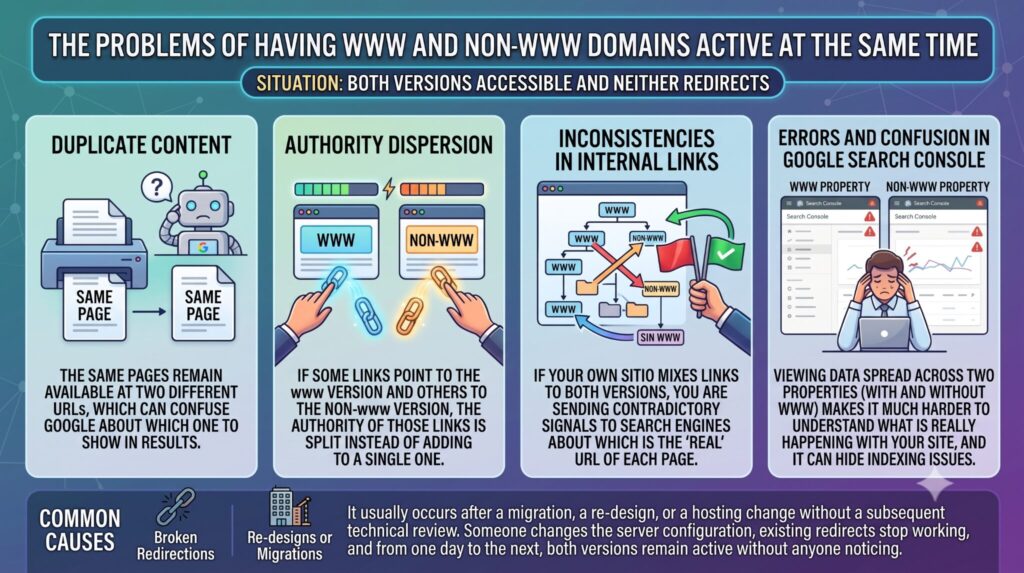
When both versions of the domain are accessible and neither redirects to the other, several problems can appear at the same time:
- Duplicate content: the same pages become available at two different URLs, which can confuse Google about which one to show in the results.
- Authority dilution: if some links point to the www version and others to the non-www version, the authority from those links is split between two URLs instead of consolidating into one.
- Inconsistencies in internal links: if your own site mixes links to both versions, you are sending contradictory signals to search engines about which is the “real” URL of each page.
- Errors and confusion in Google Search Console: seeing data split between two properties (with and without www) makes it much harder to understand what is really happening with your site, and can hide indexing issues that would otherwise be easy to detect.
This type of error tends to appear on sites that went through a migration, a redesign, or a hosting change without a subsequent technical review. Someone changes the server configuration, the redirects that previously existed stop working, and overnight both versions end up active without anyone noticing.
How to choose the right version for your domain?
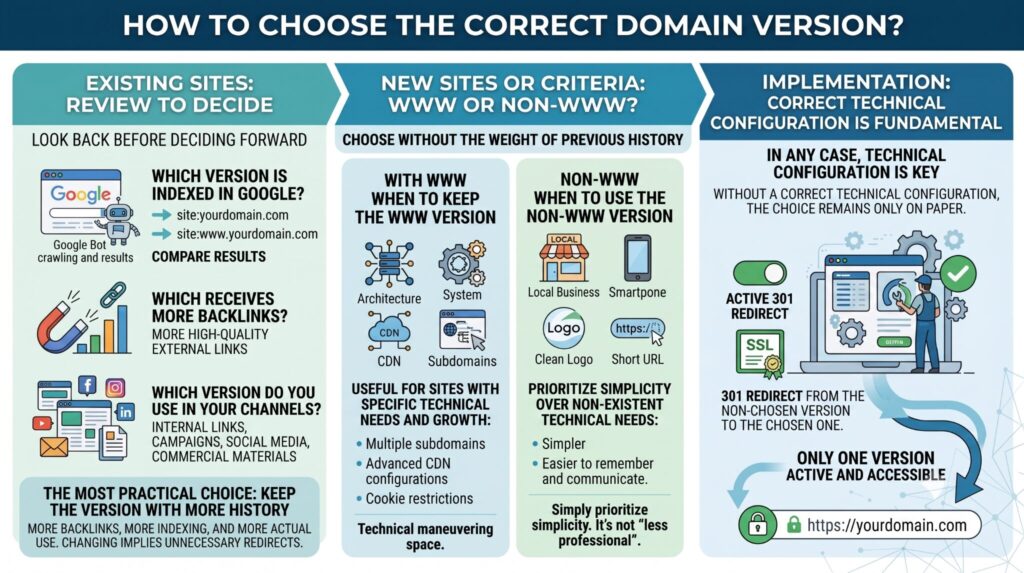
If your site has already been running for some time, the first step is to look back before deciding how to move forward. Check:
- Which version is indexed in Google (you can search site:yourdominio.com and site:www.yourdominio.com to compare).
- Which of the two receives more backlinks.
- Which version you use in your internal links, campaigns, social media profiles, and marketing materials.
The most practical approach, in most cases, is to stick with the version that already has the most history: more backlinks, more indexing, and more actual usage across your digital ecosystem. Switching versions involves redirects and an adjustment period that, if unnecessary, is best avoided.
If, on the other hand, you are building a new site, the choice can be based on branding criteria, simplicity, and technical architecture, without the weight of any prior history.
When it makes sense to keep the www version?
The www can be useful on large sites with specific technical needs: multiple subdomains, advanced CDN configurations, or cookie restrictions across different parts of the infrastructure. If your business is at a growth stage where these technical considerations are starting to matter, keeping the www can give you a little more room to maneuver.
When to use the version without www?
For most brands, local businesses, institutional sites, and corporate pages, the non-www version tends to be simpler and easier to remember and communicate. There is nothing “less professional” about it: it simply prioritizes simplicity over technical needs that, in most cases, that type of site does not have.
In either case, the choice must be accompanied by correct technical configuration. Without that, the decision remains only on paper.
How to correctly configure the chosen version?
Once you have defined which version will be your primary one, there are a series of technical steps worth reviewing (which are normally handled by a developer or an SEO specialist):
- Define the canonical version of the domain, according to Google’s canonicalization criteria.
- Apply 301 redirects from the version you did not choose to the primary one, so that both users and search engines always land in the same place.
- Review the site’s internal links and correct any that point to the wrong version.
- Update the sitemap so that it only includes URLs from the chosen version.
- Configure the canonical tags on each page, pointing to their correct version.
- Verify the corresponding property in Google Search Console and check that there are no mixed signals between both versions.
Choosing a version “in words” is not enough. If the technical configuration does not support that decision, you will continue having the same problems as always, only harder to detect because you believe it is already resolved.
Frequently asked questions about the domain with or without www
Does using www negatively affect SEO?
No, neither www nor non-www carries a penalty in itself. The problem appears when both versions remain active without a redirect, not because of whichever version you choose.
Can I switch from www to non-www (or the other way around) without losing rankings?
Yes, as long as the migration is done with properly configured 301 redirects, sitemap updates, internal link adjustments, and verification in Google Search Console. A poorly executed migration can indeed cause temporary traffic losses.
How do I know which version my site is currently using?
Go to your site by typing both versions (with and without www) and see which one the browser redirects you to. That is usually the version configured as the primary one. You can also check it in Google Search Console, where the verified property is listed.
What happens if Google has indexed both versions of my domain?
It is a sign that redirect or canonical configuration is missing. It is worth addressing as soon as possible, because as long as that continues, your authority and your links are being split between two URLs instead of consolidating into one.
Conclusion: Choose a version and be consistent
What matters is that your site has a single defined version, with all SEO signals (links, sitemap, redirects, canonical tags) aligned toward that version.
This type of technical error is very common and, at the same time, very easy to overlook if not reviewed in detail. An SEO audit makes it possible to detect exactly this type of inconsistency before it ends up affecting your organic visibility. If you want to know how your site is configured, at our SEO agency we can help you review it.
- Vibe coding: improvising with AI or a new way to program? - August 3, 2026
- Domain with www or without www: which is better for SEO? - June 22, 2026
- 301 redirect: what is it and why is it key in SEO? - April 23, 2026
¿Qué te pareció este artículo?
What do you think about this post?